Overview
I wrote a Kubernetes book called “Kubernetesマイクロサービス開発の実践” (Practical Kubernetes Microservices Development), and it’s now out! Please go buy it!
Chapter 7 of the book covers the process from when a Pod object is created on the API Server to when the Pod actually starts running — but for various reasons, there’s one particularly nitty-gritty piece of behavior we couldn’t fit in the book: what happens when a Pod has multiple containers, and one or more of them uses a postStart lifecycle hook. This post writes up how such a Pod behaves when it starts.
📘【note】 This post is day 20 of Kubernetes Advent Calendar 2023.
The Pod we’ll use
In this post we’ll experiment with a Pod containing multiple containers (container1, container2) as described in the manifest below. It’s a bit long, but here’s roughly what it does:
- container1 has a main process, a postStart hook, a readiness probe, and a liveness probe, each of which writes a log line to
/var/log/startup-sequence-test/messageonce a second - container2 has a main process that writes a log line to the same file once a second
apiVersion: v1
kind: Pod
metadata:
  name: startup-sequence-test
  namespace: default
spec:
  containers:
  - name: container1
    image: busybox:latest
    args:
    - /bin/sh
    - -c
    - |
      for i in $(seq 60); do
        echo "$(date): container1 / main" >> /var/log/startup-sequence-test/message
        sleep 1
      done
      tail -f /dev/null
    lifecycle:
      postStart:
        exec:
          command:
          - "/bin/sh"
          - "-c"
          - |
            for i in $(seq 30); do
              echo "$(date): container1 / post start hook" >> /var/log/startup-sequence-test/message
              sleep 1
            done
    readinessProbe:
      exec:
        command:
        - "/bin/sh"
        - "-c"
        - |
          echo "$(date): container1 / readiness probe" >> /var/log/startup-sequence-test/message
    livenessProbe:
      exec:
        command:
        - "/bin/sh"
        - "-c"
        - |
          echo "$(date): container1 / liveness probe" >> /var/log/startup-sequence-test/message
    volumeMounts:
    - mountPath: /var/log/startup-sequence-test
      name: log-volume
  - name: container2
    image: busybox:latest
    args:
    - /bin/sh
    - -c
    - |
      for i in $(seq 60); do
        echo "$(date): container2 / main" >> /var/log/startup-sequence-test/message
        sleep 1
      done
      tail -f /dev/null
    volumeMounts:
    - mountPath: /var/log/startup-sequence-test
      name: log-volume
  volumes:
  - name: log-volume
    emptyDir: {}
Once we apply this Pod to the cluster, checking the contents of /var/log/startup-sequence-test/message tells us the order in which each of these processes actually ran.
Expected behavior
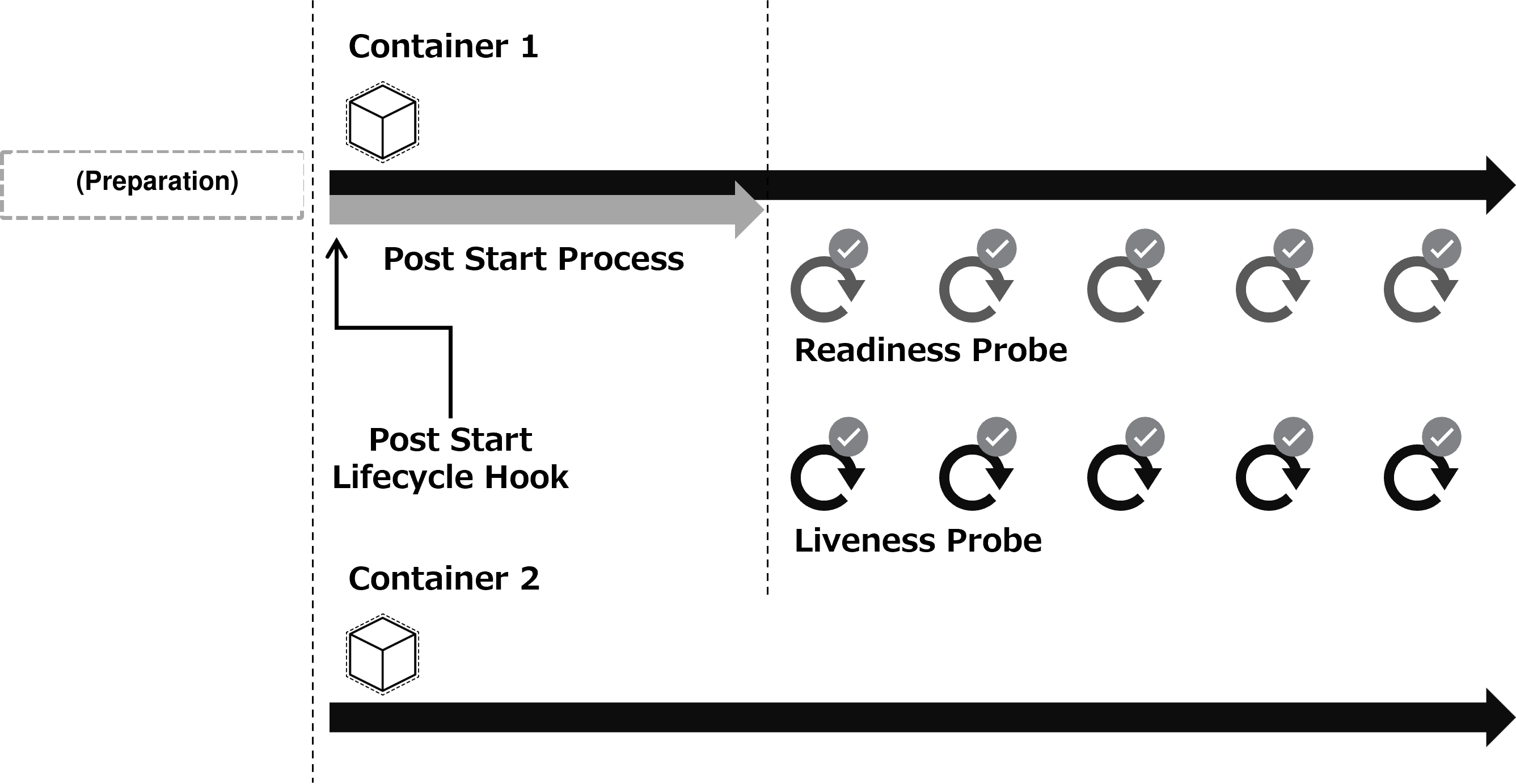
Before running the experiment, let’s predict what should happen. Roughly something like this, maybe…?
- The main processes of container1 and container2 both start (there doesn’t seem to be any dependency in the startup order of containers within a Pod)
- Right after container1’s main process starts, its postStart hook starts
- Once 2. finishes, the readiness probe and liveness probe start
Drawn as a diagram, this prediction looks like the following — the two containers start up at roughly the same time.
Running the experiment
Now let’s actually apply it to the cluster and watch what happens as it starts up.
$ kubectl apply -f startup-sequence-test.yaml && kubectl get pod startup-sequence-test -w
pod/startup-sequence-test created
NAME                    READY   STATUS              RESTARTS   AGE
startup-sequence-test   0/2     ContainerCreating   0          0s
startup-sequence-test   1/2     Running             0          37s  <-- one of the two containers becomes READY
startup-sequence-test   2/2     Running             0          37s  <-- the other container becomes READY
Looking at the kubectl get pod output above, something already seems off from our prediction: both containers take 37s to become READY. container2 doesn’t have a postStart hook or any probes configured, so it should become READY as soon as it starts…
Let’s look at the log output next.
$ kubectl exec startup-sequence-test -- cat /var/log/startup-sequence-test/message
Defaulted container "container1" out of: container1, container2
Thu Dec 21 10:40:51 UTC 2023: container1 / main
Thu Dec 21 10:40:51 UTC 2023: container1 / post start hook
Thu Dec 21 10:40:52 UTC 2023: container1 / main
Thu Dec 21 10:40:52 UTC 2023: container1 / post start hook
Thu Dec 21 10:40:53 UTC 2023: container1 / main
Thu Dec 21 10:40:53 UTC 2023: container1 / post start hook
...(about 30 seconds)...
Thu Dec 21 10:41:21 UTC 2023: container1 / main
Thu Dec 21 10:41:22 UTC 2023: container1 / main
Thu Dec 21 10:41:23 UTC 2023: container2 / main
Thu Dec 21 10:41:23 UTC 2023: container1 / main
Thu Dec 21 10:41:23 UTC 2023: container1 / readiness probe
Thu Dec 21 10:41:23 UTC 2023: container1 / liveness probe
Thu Dec 21 10:41:23 UTC 2023: container1 / readiness probe
Thu Dec 21 10:41:24 UTC 2023: container2 / main
Thu Dec 21 10:41:24 UTC 2023: container1 / main
Thu Dec 21 10:41:24 UTC 2023: container1 / liveness probe
Thu Dec 21 10:41:24 UTC 2023: container1 / readiness probe
...
So, we predicted that container1’s and container2’s main processes would start at roughly the same time, but it looks like container2 doesn’t actually start until container1’s postStart hook finishes. Point 1 of our prediction turned out to be wrong.
This result tells us that container2 starting depends on container1’s postStart hook finishing — but how is that dependency actually determined? The first thing that comes to mind is the order the containers are listed in the Pod resource.
Experiment 2
To check whether the order containers are listed in the Pod resource affects the startup dependency, let’s run the experiment again with container1 and container2 listed in reverse order. Here’s the manifest:
apiVersion: v1
kind: Pod
metadata:
  name: startup-sequence-test
  namespace: default
spec:
  containers:
  - name: container2
    # ... only the order changed, contents are the same
  - name: container1
    # ... only the order changed, contents are the same
  volumes:
  - name: log-volume
    emptyDir: {}
Let’s apply this the same way and check kubectl get and the logs.
$ kubectl apply -f startup-sequence-test-2.yaml && kubectl get pod startup-sequence-test -w
pod/startup-sequence-test created
NAME                    READY   STATUS              RESTARTS   AGE
startup-sequence-test   0/2     ContainerCreating   0          0s
startup-sequence-test   1/2     Running             0          35s  <-- one of the two containers becomes READY
startup-sequence-test   2/2     Running             0          35s  <-- the other container becomes READY

$ kubectl exec startup-sequence-test -- cat /var/log/startup-sequence-test/message
Defaulted container "container2" out of: container2, container1
Thu Dec 21 12:17:07 UTC 2023: container2 / main
Thu Dec 21 12:17:08 UTC 2023: container2 / main
Thu Dec 21 12:17:08 UTC 2023: container1 / main
Thu Dec 21 12:17:08 UTC 2023: container1 / post start hook
Thu Dec 21 12:17:09 UTC 2023: container2 / main
Thu Dec 21 12:17:09 UTC 2023: container1 / main
Thu Dec 21 12:17:09 UTC 2023: container1 / post start hook
Thu Dec 21 12:17:10 UTC 2023: container2 / main
Thu Dec 21 12:17:10 UTC 2023: container1 / main
Thu Dec 21 12:17:10 UTC 2023: container1 / post start hook
...(about 30 seconds)...
Thu Dec 21 12:17:38 UTC 2023: container2 / main
Thu Dec 21 12:17:38 UTC 2023: container1 / main
Thu Dec 21 12:17:39 UTC 2023: container2 / main
Thu Dec 21 12:17:39 UTC 2023: container1 / readiness probe
Thu Dec 21 12:17:39 UTC 2023: container1 / main
Thu Dec 21 12:17:40 UTC 2023: container2 / main
Thu Dec 21 12:17:40 UTC 2023: container1 / readiness probe
Thu Dec 21 12:17:40 UTC 2023: container1 / liveness probe
Thu Dec 21 12:17:40 UTC 2023: container1 / main
Thu Dec 21 12:17:41 UTC 2023: container2 / main
Thu Dec 21 12:17:41 UTC 2023: container1 / readiness probe
Thu Dec 21 12:17:41 UTC 2023: container1 / liveness probe
...
The container still doesn’t become READY until container1’s postStart hook finishes, just like the first experiment. But looking at the logs, container2’s processing starts right away, followed by container1’s main process and postStart hook. In this case, container2 doesn’t seem to be waiting on container1’s postStart hook at all.
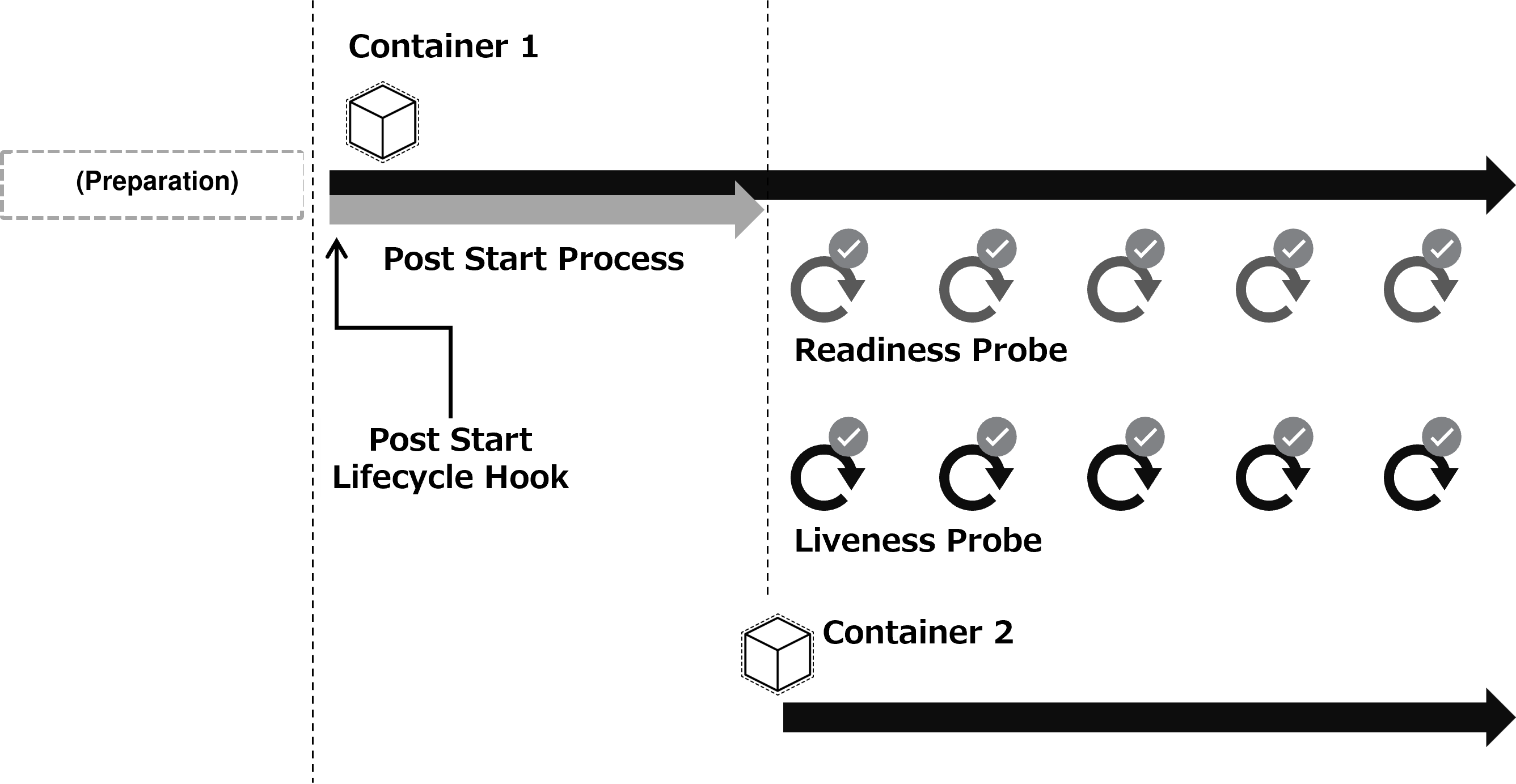
So, it seems the startup order for a Pod with multiple containers works like this:
- Containers start in the order they’re listed in the manifest
- If a postStart hook is configured, the next container doesn’t start until that hook finishes
As a diagram, it looks like this:
Looking at the implementation
Based on the experiment results, this looks like the startup order — but let’s also confirm it by looking at the actual code. The kubelet is the component responsible for starting Pods, so let’s dig through the kubelet’s code to find the relevant part.
First, here’s where the start() function that triggers container startup gets called:
	for _, idx := range podContainerChanges.ContainersToStart {
		start(ctx, "container", metrics.Container, containerStartSpec(&pod.Spec.Containers[idx]))
	}
We can see it loops over the multiple containers described in the Pod and calls start() serially.
Next, here’s what’s inside start():
	start := func(ctx context.Context, typeName, metricLabel string, spec *startSpec) error {
		# ...(snip)...

		if msg, err := m.startContainer(ctx, podSandboxID, podSandboxConfig, spec, pod, podStatus, pullSecrets, podIP, podIPs); err != nil {
			# ...(snip)...

			return err
		}

		return nil
	}
start() in turn calls m.startContainer().
Here’s what’s happening inside m.startContainer():
func (m *kubeGenericRuntimeManager) startContainer(ctx context.Context, podSandboxID string, podSandboxConfig *runtimeapi.PodSandboxConfig, spec *startSpec, pod *v1.Pod, podStatus *kubecontainer.PodStatus, pullSecrets []v1.Secret, podIP string, podIPs []string) (string, error) {
	container := spec.container

	// Step 1: pull the image.
	...(snip)...

	// Step 2: create the container.
	// For a new container, the RestartCount should be 0
	...(snip)...

	// Step 3: start the container.
	err = m.runtimeService.StartContainer(ctx, containerID)
	...(snip)...

	// Step 4: execute the post start hook.
	if container.Lifecycle != nil && container.Lifecycle.PostStart != nil {
		kubeContainerID := kubecontainer.ContainerID{
			Type: m.runtimeName,
			ID:   containerID,
		}
		msg, handlerErr := m.runner.Run(ctx, kubeContainerID, pod, container, container.Lifecycle.PostStart)
		if handlerErr != nil {
			klog.ErrorS(handlerErr, "Failed to execute PostStartHook", "pod", klog.KObj(pod),
				"podUID", pod.UID, "containerName", container.Name, "containerID", kubeContainerID.String())
			// do not record the message in the event so that secrets won't leak from the server.
			m.recordContainerEvent(pod, container, kubeContainerID.ID, v1.EventTypeWarning, events.FailedPostStartHook, "PostStartHook failed")
			if err := m.killContainer(ctx, pod, kubeContainerID, container.Name, "FailedPostStartHook", reasonFailedPostStartHook, nil, nil); err != nil {
				klog.ErrorS(err, "Failed to kill container", "pod", klog.KObj(pod),
					"podUID", pod.UID, "containerName", container.Name, "containerID", kubeContainerID.String())
			}
			return msg, ErrPostStartHook
		}
	}

	return "", nil
}
At the part marked Step 4, the postStart hook is run, and it looks like execution waits until the result comes back. If the postStart hook’s processing were asynchronous, we’d expect it to exit Step 4 right away and move on — but since that’s not the case, this is where execution blocks. And if it blocks here, the loop shown earlier — i.e., starting the next container — doesn’t proceed.
This appears to be what causes the next container’s startup to wait until the postStart hook finishes.
Summary
So, if you have a Pod with multiple containers and you’re using a postStart hook, watch out for the startup order!
🙏【Acknowledgments】 This post grew out of a question from a Kubernetes user inside my company, and the investigation my teammates did in response to it. I’d like to take this opportunity to thank them.
That’s all. Thanks for reading to the end. Merry Christmas!